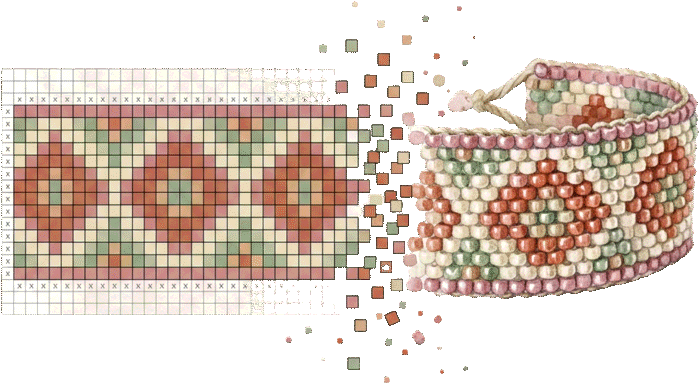
Peyote Stitch Pattern Generator
This peyote stitch pattern generator turns a picture into a chart with Miyuki Delica colors, a bead legend, and a word chart — ready to weave.
Miyuki Delica 11/0Word chart includedFree, in your browser
This peyote stitch pattern generator turns a picture into a chart with Miyuki Delica colors, a bead legend, and a word chart — ready to weave.
This peyote stitch pattern generator turns pictures, words, and ready-made motifs into even-count peyote charts for Miyuki Delica 11/0 seed beads. Every bead is matched to a real Delica color code, and the PDF includes both a visual chart and a word chart — the row-by-row bead counts experienced beaders weave from.
Bracelet mode checks your design against a wrist size and can repeat the motif seamlessly until the band is long enough. You can also type a name to get an instant name-bracelet chart, or start from dozens of built-in band designs — stripes, chevrons, diamonds — recolored with your own palette.
Upload an image, type a word, or pick from the built-in band designs and recolor them.
Choose the width in beads, limit the colors, and turn on bracelet mode to match a wrist size.
Get the peyote chart, Delica bead legend with gram estimates, and the complete word chart.
Peyote lives or dies on how squarely the beads stack. A rounded seed bead is barrel-shaped, so it nests into its neighbors and eats a little of every edge — fine for texture, but a picture built from them ends up soft and lumpy, with lines that wobble a bead's width off true. Miyuki Delica 11/0 beads are cylinders: flat-sided, thin-walled, and machine-cut to a remarkably consistent size. Woven up in peyote they tile like tiny bricks, and because each brick is a clean rectangle the chart's pixels land where you expect them. Curves read as curves and text stays legible instead of dissolving into fuzz.
That uniformity is also why this converter targets Delica 11/0 specifically. It resamples your photo to the chart's bead grid and matches every cell to a real DB color code, so what you see redrawing in the browser as you move the sliders is close to what the finished band will look like — no guessing how a rounded bead's roundness will blur the result. Delicas come in more than 1,500 colors, including a deep range of matte, opaque, and metallic finishes, which gives the color matcher enough targets to keep skin tones and gradients from banding.
Flat peyote comes in two flavors. In even-count peyote every row turns the same tidy way, and the thread path at the end of each row is simple and symmetric. In odd-count peyote you have one 'extra' bead per pair of rows, which forces a fiddly figure-eight turnaround on one edge to lock that last bead in place. Beaders reach for odd-count when a design needs a true center column — a single spine of color running straight up the middle, common in symmetric motifs and some letters.
The charts here are built for even-count peyote, which is the friendlier starting point and the one most band and bracelet patterns use. That means you pick an even number for the width in beads. If you're new to reading peyote diagrams, note the offset: beads in alternating columns sit half a bead higher or lower than their neighbors, so the grid looks like staggered brickwork rather than a square checkerboard. Count columns across, not the visual rows, when you're setting width — a 'row' in peyote terms is actually the up-beads and down-beads you add in one pass across the work.
Delica 11/0 works out to roughly 16 beads per inch across the width of a band (about 6 beads per centimeter) — the same 1.6 mm per bead the tool’s size readout uses. That ratio is your whole sizing map. A dainty band of 11 beads finishes around 0.7 in (1.8 cm) wide; 15 beads lands near 1 in (2.4 cm), a comfortable everyday width; and a bold cuff of 27–35 beads spans roughly 1.7–2.2 in (4.3–5.6 cm). Because the tool wants an even count for even-count peyote, favor widths like 12, 16, 20, or 30 rather than the odd numbers you'll see in some published patterns.
Width also decides how much picture you get. Fewer than about 12 beads and a photo has almost no room to say anything — stick to stripes, chevrons, or a name. Detailed portraits and dense motifs want 25 beads and up. If your design is really a flat grid rather than a staggered one — square-on pixel art, wide graphic panels — the bead loom tool weaves on a straight grid where beads sit in aligned rows and columns, which suits blocky images and is often quicker to read.
The visual chart shows the staggered brick layout, which is honest about how the beads sit but slow to follow bead by bead. That's what the word chart is for, and it's worth leaning on. It lists each row as a run of counts and color codes in exact weaving order — read it as 'this many of this color, then this many of that' and you never have to hunt across a diagram mid-row. Most experienced beaders keep the visual chart on the table as a map and actually weave from the word chart.
A few habits make it painless. Mark your starting edge before you begin, because peyote looks identical from both ends until the picture emerges and it's easy to start a row from the wrong side. Cross off each word-chart row as you complete it — a ruler or sticky note under the current line does the job. And check your work every few rows against the visual chart: in even-count peyote a dropped or doubled bead throws off the offset, and it's far cheaper to notice three rows back than thirty.
Thread choice sets how the band behaves. Braided threads like Fireline (6 lb for 11/0 is the common pick, 4 lb if you're doubling passes through tight beads) are strong and nearly cut-proof against sharp Delica edges, and they give a firm, structured band that holds a picture crisply — ideal for cuffs. Nylon threads like Nymo and One-G/KO are softer and drape more, which some beaders prefer for supple bracelets; they fray more easily, so condition Nymo with microcrystalline wax or beeswax and start with a manageable arm's length rather than fighting a yard of tangle.
For needles, a size 11 or 12 beading needle passes through 11/0 Delicas comfortably; drop to a 13 only when a bead needs several thread passes and the hole is getting crowded. Tension is the real skill in peyote: pull each bead snug so it seats against its neighbors, but not so hard that the band curls or stiffens into a taco. Aim for a fabric that flexes like a strip of thick ribbon. Beads that rattle mean you're too loose; a band that won't lie flat means you're too tight or your thread is too heavy for the count.
Delica colors are sold by the tube — a 5-gram tube runs about $3–4 and a 7.5-gram tube a little more — and each new color in your legend is a tube you have to buy, store, and dig through mid-project. So color count isn't just a look-at decision the way it is on screen; it's a shopping list. The legend here estimates grams per color, which tells you when a color is a genuine field versus a stray handful of beads you're buying a whole tube to place a dozen times.
Generate the chart at a generous color count first, then step down and watch the preview. Stop just before the areas you care about — a face, a sky, a smooth gradient — start to band or blotch. For most bands 6–12 colors carry a clean design; photographic pieces might want 15–20, at which point you're committing real money to the palette, so be ruthless about colors that appear only in noise. If a busy background is stealing colors from your subject, clear it with the background remover before uploading — the freed-up palette all goes toward the part you actually want to see in beads. Everything runs in your browser, so nothing you upload leaves your device, and you can iterate on width and colors as often as it takes before committing a cent to tubes.
Yes — free with no account. The full PDF, including the word chart, downloads at no cost.
A word chart lists each row as bead counts — like (3)DB0010, (2)DB0201 — in exact weaving order. Most beaders find it easier to follow than reading a picture chart.
Miyuki Delica 11/0 cylinder beads, the standard for peyote work. Colors are matched to real DB color codes, and the legend estimates grams and 5g tubes per color.
Pick a wrist size and the tool calculates how many rows the band needs. Turn on repeat and the motif tiles seamlessly to reach the full length.
Yes — switch to text mode, type the name, choose the letter and background colors, and the chart is generated instantly.
Yes. The pattern is generated in your browser; nothing is uploaded.